GST returns for every client, straight from the portal
TBB GST Recon downloads each client's GSTR-1, 2A, 2B, 3B and IMS (GSTR-4A for composition dealers) from the GST portal, along with the e-invoices (IRNs), reconciles them with the purchase and sales registers you upload from any accounting software, lets you act on IMS, and works out the ITC each client has to reverse. Unlimited reports and re-runs: no credits to count. Install it on every desk in the office: up to 10 concurrent active users on one licence.
Plans from ₹8,000 + GST a year. Silver: 20 clients, 2 users at a time.
 Watch the 3-minute video
Everything you do on the GST portal, for every client, in one place
Add a client with their GSTIN and portal username, sign in with their password and captcha, and fetch the whole year.
Fetch
GSTR-1, 2A, 2B, 3B and IMS for the whole financial year in one go, picking up where it left off. GSTR-4A for composition dealers.
Your books
Upload each client's purchase and sales register as Excel or CSV, from Tally, Busy, Zoho or any software. Start from our template, or use your software's export as it is.
Reconcile
2B vs purchase register, GSTR-1 vs sales register, e-invoices (IRNs) vs sales register, 2B vs 3B, GSTR-1 vs 3B and 2A vs 2B, with every difference flagged. 4A vs purchase register for composition dealers.
IMS actions
Each invoice checked against the purchase register with a proposed action: accept, reject or keep pending, then post to GSTN.
Reports
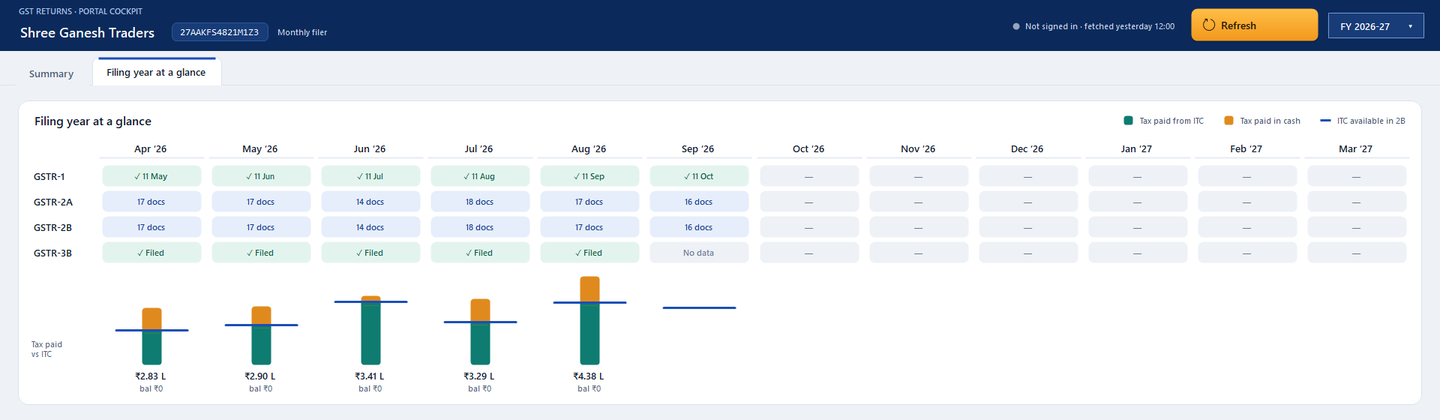
Every return month by month and document by document, the filing year at a glance, with Excel export for each.
No report limits
Fetch, re-run and export as often as you need. You pay per client, never per report.
GST filing, with you in the loop
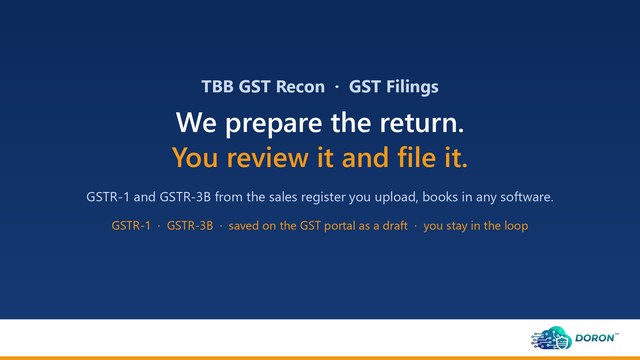
GSTR-1 and GSTR-3B prepared from the sales register you upload, checked, and saved on the GST portal as a draft. You review it and you file, from the portal window inside the app, already signed in.
 Watch the 2-minute video
GSTR-1 from the register
B2B, B2C large and others, exports, credit and debit notes, nil rated, the HSN summary and documents issued, built from the sales register and its optional GSTR-1 columns.
Checked before it's saved
Must fix (wrong tax for the place of supply, a missing HSN, a number the portal won't take) stops the save; Look at flags the rest. GSTR-3B: Table 3 from the register, 4(B) reversals from you.
You review, you file
Saved on the portal as a draft. Open it from the app, already signed in, check it and file with EVC or DSC. Every draft saved or reset is logged with who and when.
Refund statements, filled in for you
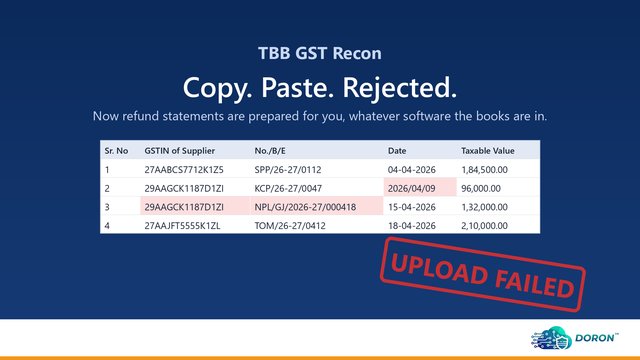
No more copying invoices into the portal's Excel and fixing the formats it rejects. Statements 1A, 3, 5 and 6 and Annexure B, prepared from the client's GSTR-2B, GSTR-1 and GSTR-3B and the purchase register you upload, then filled into the latest GSTN utility.
 Watch the 4-minute video
Four kinds of refund
Inverted tax structure, exports under LUT, supplies to SEZ without tax, and tax paid under the wrong head.
Checked row by row
Every row checked by the utility's own rules before you open it, coloured by what needs you: won't pass, to fill, or for information.
The portal's latest utility
Downloaded fresh from GSTN each time and filled in. You validate, make the JSON with the utility, then upload and file on the portal.
Composition clients too
Composition dealers have no GSTR-2A or 2B. Their suppliers' invoices come in GSTR-4A, quarter by quarter, and TBB GST Recon handles it like any other return.
 Watch the 2-minute video
Detected automatically
The app reads the client's registration from the portal. Composition months skip GSTR-1, 2A, 2B and 3B, even when a client changed scheme mid-year.
GSTR-4A every quarter
B2B invoices, credit and debit notes and amendments, fetched on every refresh as suppliers file. Or import the Excel the portal gives.
4A vs purchase register
Every supplier invoice matched with the purchases, on the invoice total, because a composition dealer's GST is part of the cost. Ready for GSTR-4.
ITC reversals, worked out for you
The credit every client has to give back in GSTR-3B, from the returns you've already fetched and the registers you've uploaded. No more tracking unpaid bills and supplier filings in a spreadsheet.
 Watch the 3-minute video
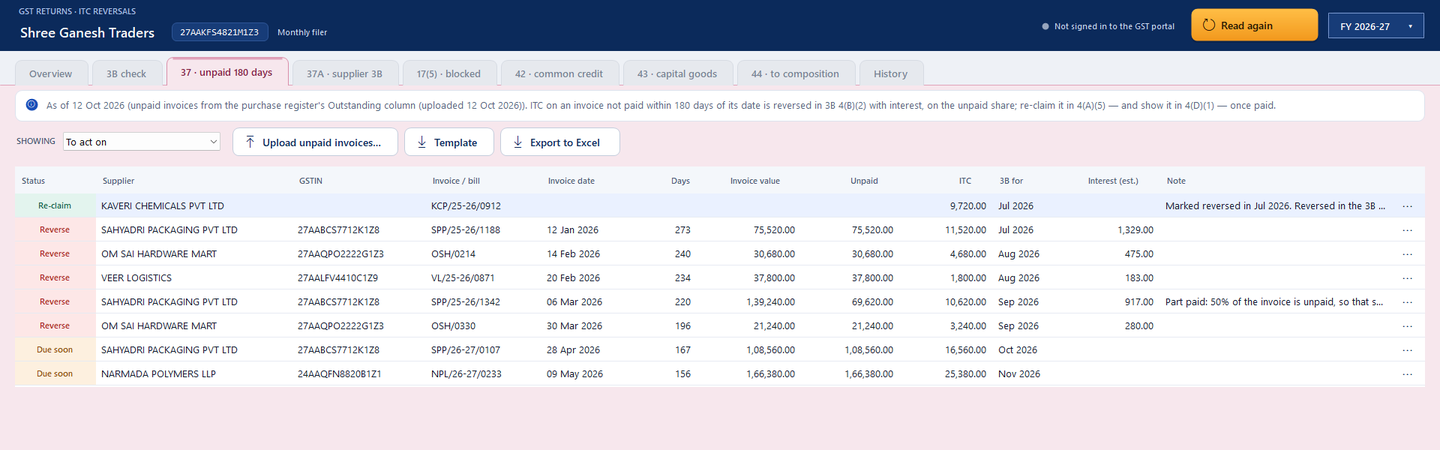
Rule 37 · unpaid 180 days
From the Outstanding column of the purchase register (or an unpaid-invoices upload): every invoice over 180 days old is listed with the ITC on its unpaid share, the 3B it goes in and an interest estimate. Due-soon ones show from day 150, so the client can pay instead.
Rule 37A · supplier's 3B not filed
Every GSTR-2B invoice checked against its supplier's GSTR-3B status for that period. Chase them before 30 September; reverse by 30 November if they still haven't filed.
Section 17(5) · blocked credit
Purchases booked to canteen, car repairs, club fees and the like (from the register's Ledger / Expense Head), or from motor dealers, restaurants and insurers, flagged for you to confirm or dismiss, with the exceptions alongside.
Rules 42 and 43 · exempt share
Common credit and capital goods split by exempt turnover straight from each 3B, month by month (D1, D2, Tc, Te), with the annual true-up worked out.
Rule 44 · switch to composition
The switch date read from the portal; stock and capital goods (less 5 points a quarter) laid out for FORM GST ITC-03, with its 60-day deadline.
Checked against 3B
What each month's 3B reversed in 4(B)(1) and 4(B)(2) side by side with what's due. Mark items reversed; re-claims appear by themselves once the supplier is paid or files.
One licence for the whole office
Your articles and staff each work on their own PC, at the same time, from one client list. No per-user fees.
2, 5 or 10 concurrent active users
Silver allows 2 concurrent active users, Gold 5 and Platinum 10. That is one concurrent active user for every 10 clients, included in the price.
Install on every desk
Activate the same voucher on as many office PCs as you like. The licence counts only the PCs where the app is open right now, so anyone can work from any desk.
One shared client list
Point every PC at a folder on your office network. Everyone sees the same clients, returns and uploaded registers. The data stays on your network.
| Silver | Gold | Platinum | |
|---|---|---|---|
| Clients | 20 | 50 | 100 |
| Concurrent active users | 2 | 5 | 10 |
| PCs you can install on | Any number | Any number | Any number |
The year, at a glance
- Outward taxable, tax liability and credit in 2B, from the portal
- Paid from credit vs paid in cash
- Things worth a look, such as credit in 2B not claimed in 3B

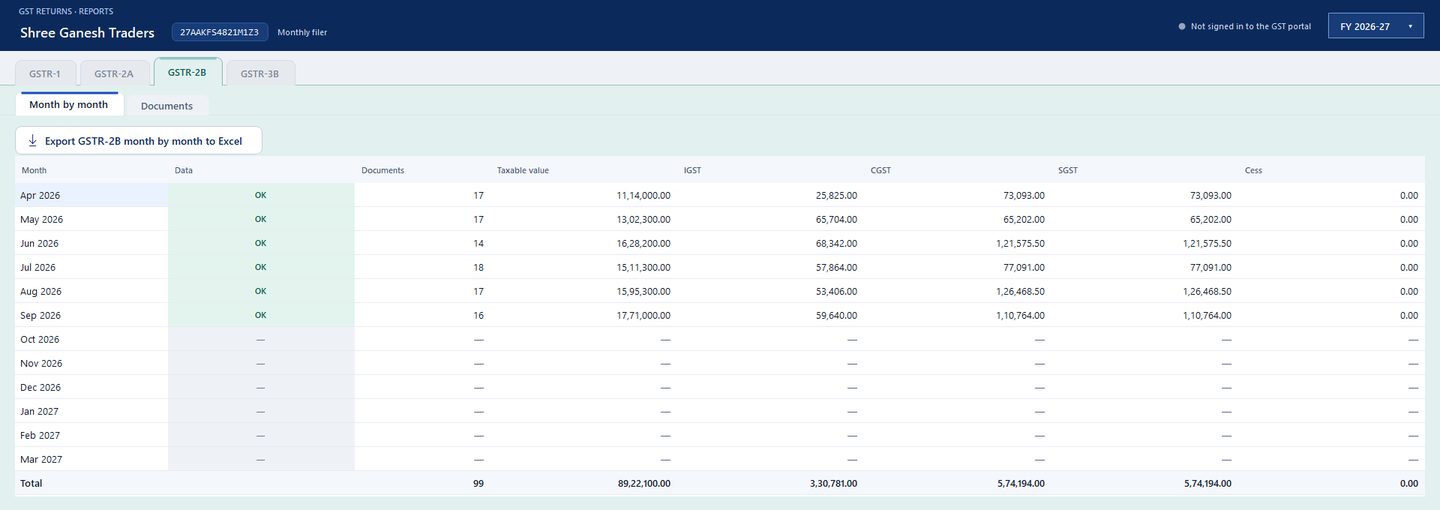
Reports for every return
- GSTR-1, 2A, 2B and 3B, month by month or document by document; GSTR-4A quarter by quarter
- A check that every month's data is complete
- Export any view to Excel
Reconciliation that flags the differences
- 2B vs purchase register: matched, amount or date differs, missing on either side, supplier not filed
- GSTR-1 vs sales register: invoice by invoice for B2B, month by month for B2C
- E-invoice vs sales register: every IRN issued on the portal matched with the books, and B2B sales with no e-invoice
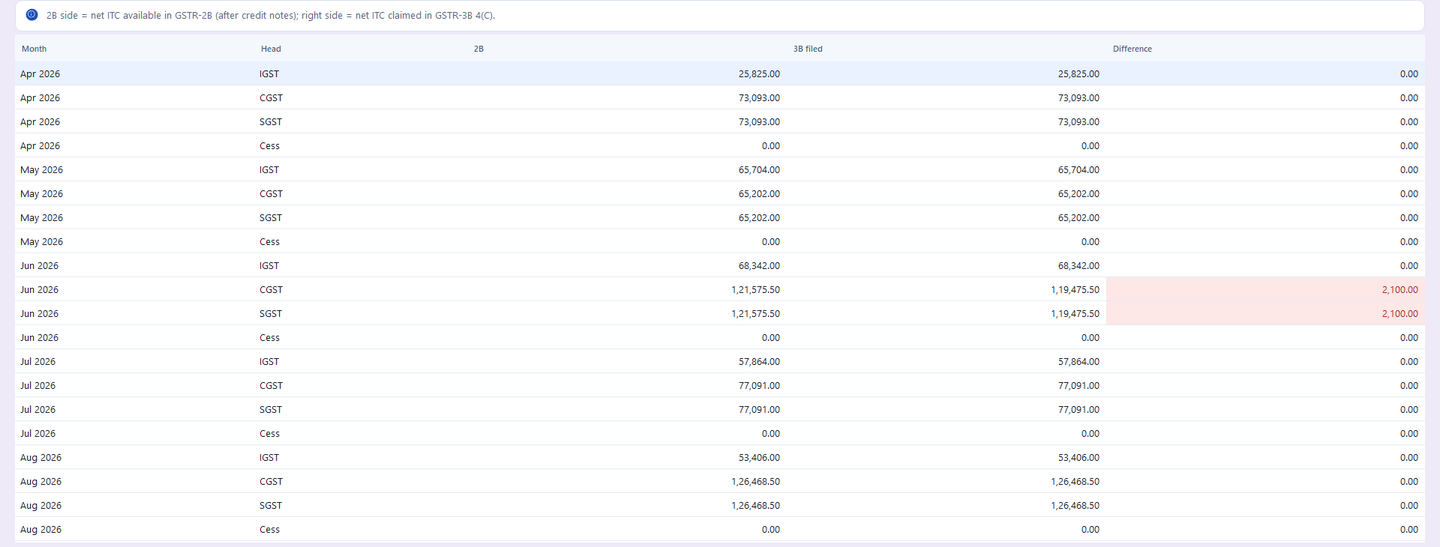
- 2B vs 3B, GSTR-1 vs 3B and 2A vs 2B, with a tolerance you set
- GSTR-4A vs purchase register for composition dealers
- ITC reversals: Rules 37, 37A, 42, 43 and 44 and blocked credit, checked against 3B
ITC reversals, checked against 3B
- Unpaid invoices over 180 days, with the 3B month, the unpaid share and an interest estimate
- Suppliers who haven't filed GSTR-3B, with the 30 September and 30 November dates
- Blocked credit, common credit and capital goods (Rules 42, 43), and ITC-03 on a switch to composition
- Each month's 4(B)(1) and 4(B)(2) side by side with what was due; re-claims flagged once paid or filed
Pay per client, not per report
Report-credit plans run out just when the filing season peaks. TBB GST Recon doesn't count.
| Report-credit plans | 👍 TBB GST Recon | |
|---|---|---|
| What you pay for | A number of reports | A number of clients |
| Fetching and re-running reports | Each one uses credits | Unlimited |
| Excel exports | Often counted | Unlimited |
| Monthly filers | Use credits up faster | Same price as quarterly |
| Your team | Check how many users the plan allows | Up to 10 at a time, included |
Then from ₹8,000 + GST a year (Silver, 20 clients).
Partner price from ₹4,000. Get a partner coupon →
Your clients' data stays with you
On your PCs
Returns, registers, reports and client profiles are stored on your own Windows PC or your office network, not on our servers.
Straight to the portal
The app signs in to the GST portal from your PC with the client's own login and captcha.
Passwords stay local
A portal password is saved only if you choose, encrypted for your Windows account.
Books in TallyPrime? TBB CA adds reconciliation against the books and posts missing invoices to Tally.